
Features
Everything Fettlecode does
What a team expects from a Git host, plus review that's built for small, stacked changes. Everything on this page works today, in every copy. What's still to come is at the end, marked as planned.
Fettlecode is in development and not released yet. This page follows its README and build plan as of 27 October 2026.
Stacked review
Small changes, in order, with plain Git.
Push your commits to refs/for/<branch>. There's no extra
command-line tool to install.
Stacks
-
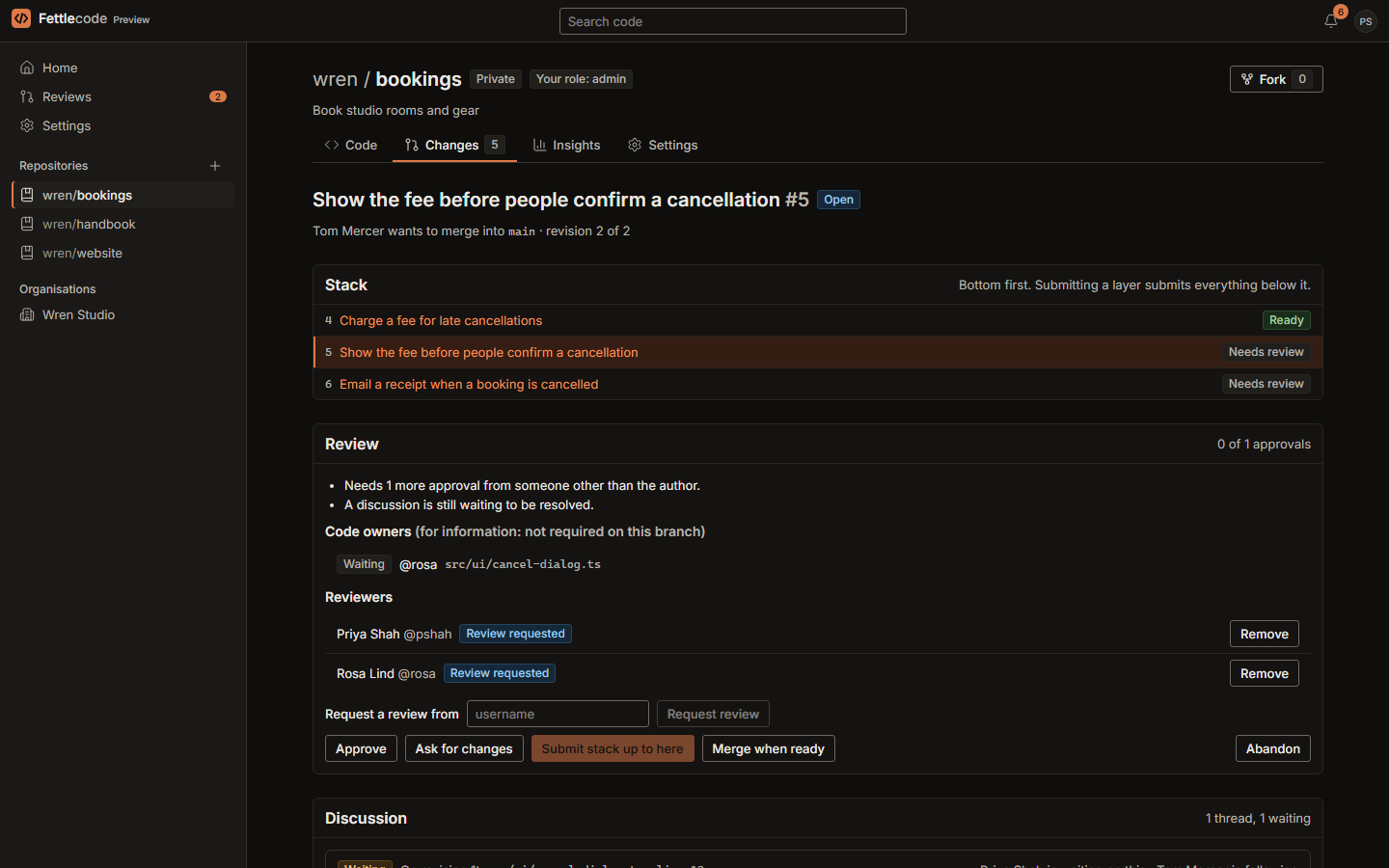
Each commit with a
Change-Idbecomes a change; a commit on top of another open change stacks on it -
A
commit-msghook, served by your Fettlecode, adds theChange-Idfor you - Push again after amending or rebasing, and each change gets a new revision
- Submit a stack bottom up: fast-forward when it can, replayed onto the branch otherwise, and all or nothing
- Works from forks too: “Propose upstream” turns a fork's commits into a stack
Review memory that survives rebases
- Every revision of every change is kept
- “Reviewed” marks and approvals are tied to a hash of the work, so a clean rebase keeps them, and an edit clears only what changed
- “Since you last looked” shows only what the author changed between revisions, with changes that came in from the rebase taken out
- Approve, or ask for changes, with a message
- Diffs are coloured by language, with the words that changed within a line marked

Discussions and reviewers
Everyone says where they stand.
Comment threads
- On a line, a file, or the whole change
- Each person in a thread is waiting for an answer, following, or resolved; a change can't merge while someone is waiting, and only they can settle it
- A thread stays on its line while that file's work is unchanged
- @mentions tell people, and edit your own comments
Asking for reviews
- Request reviews from specific people
- They see it under “Waiting for your review” on their home page
- Each change shows where every reviewer stands
- By default, one approval from someone other than the author is enough; branch rules can ask for more
Rules, code owners and the merge queue
Controls that other hosts keep for paid plans.
Branch and completion rules
- Checked on every push, over HTTPS and SSH
- Make a branch review-only, require a role for direct pushes, block force pushes and deletion, and ask for more approvals
- Choose whether waiting discussions and “ask for changes” hold a merge, and whether every requested reviewer or the code owners must approve
- Refused pushes say why, and how to send the change for review instead
Code owners and the merge queue
-
A
CODEOWNERSfile names owners by person, team or email; it's read from the target branch, so a change can't make itself its own owner - Each change shows its owners and whether they've approved
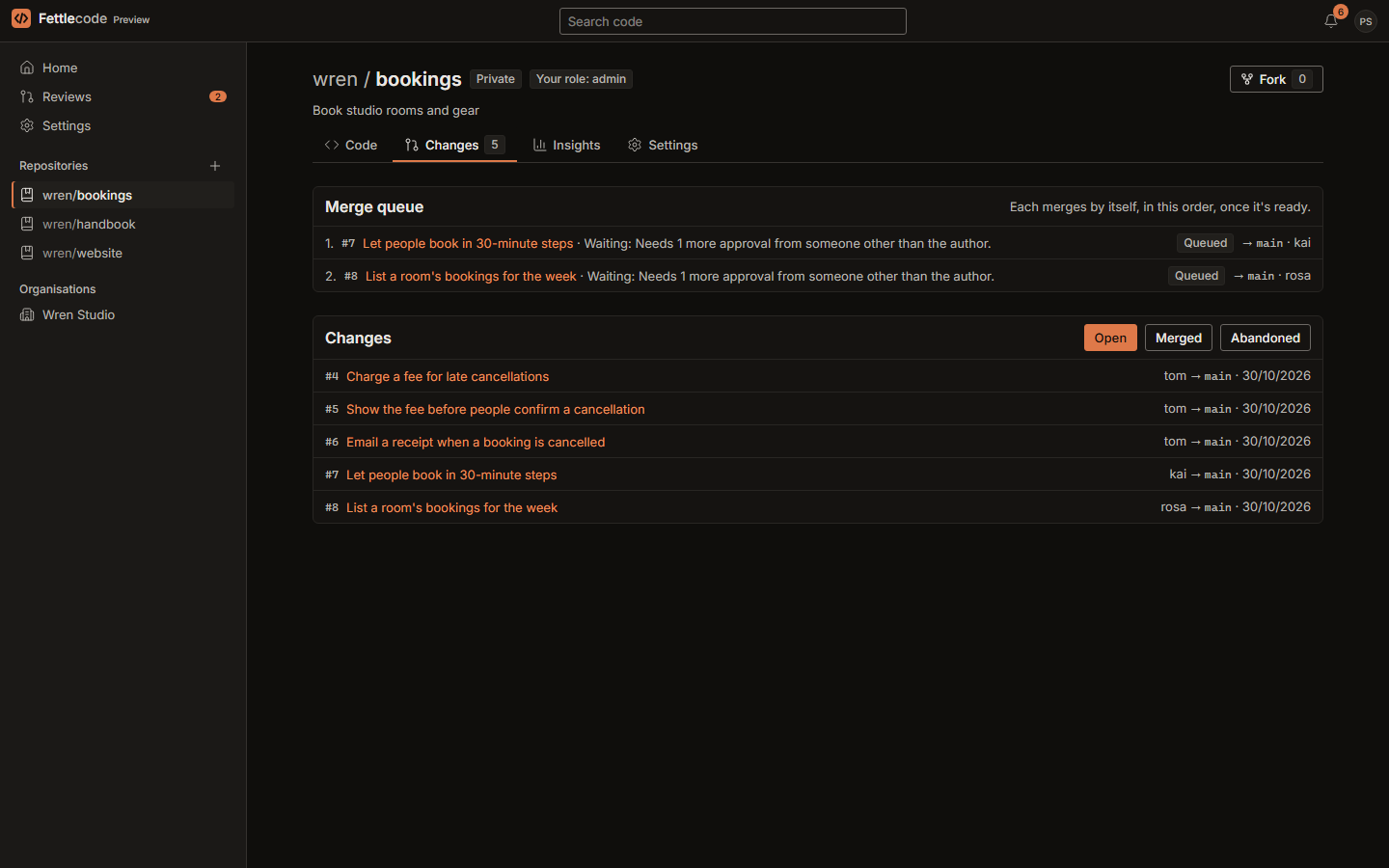
- “Merge when ready” queues a change before it's approved; queued changes merge by themselves, in order, as soon as approvals and discussions allow
- A change that no longer applies, gets a new revision or is abandoned leaves the queue, and whoever queued it is told why
Code, search and releases
The repository pages you're used to.
Browsing and editing
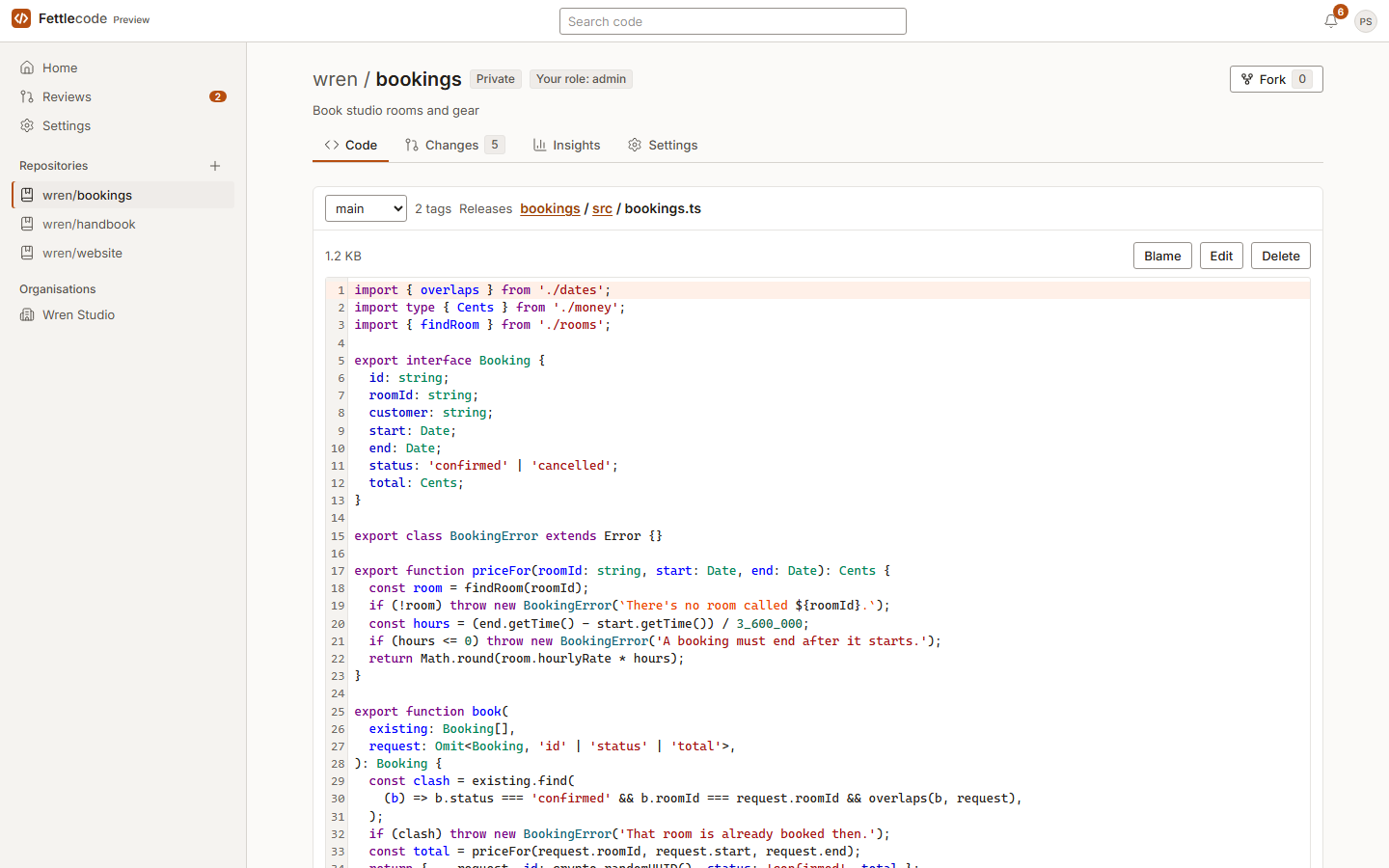
- Pick a branch or tag, browse folders and read files with syntax highlighting
- History, and Blame linked to the change each line came in by
- Edit, create, rename or delete files in a code editor, or drag in files and whole folders
- Commit straight to the branch when you're allowed to, or propose the edit as a change; open changes can be edited in the browser too
- Git over HTTPS with access tokens, and over SSH with your keys
- Git LFS for large files, with the same token as Git
Search, forks and releases
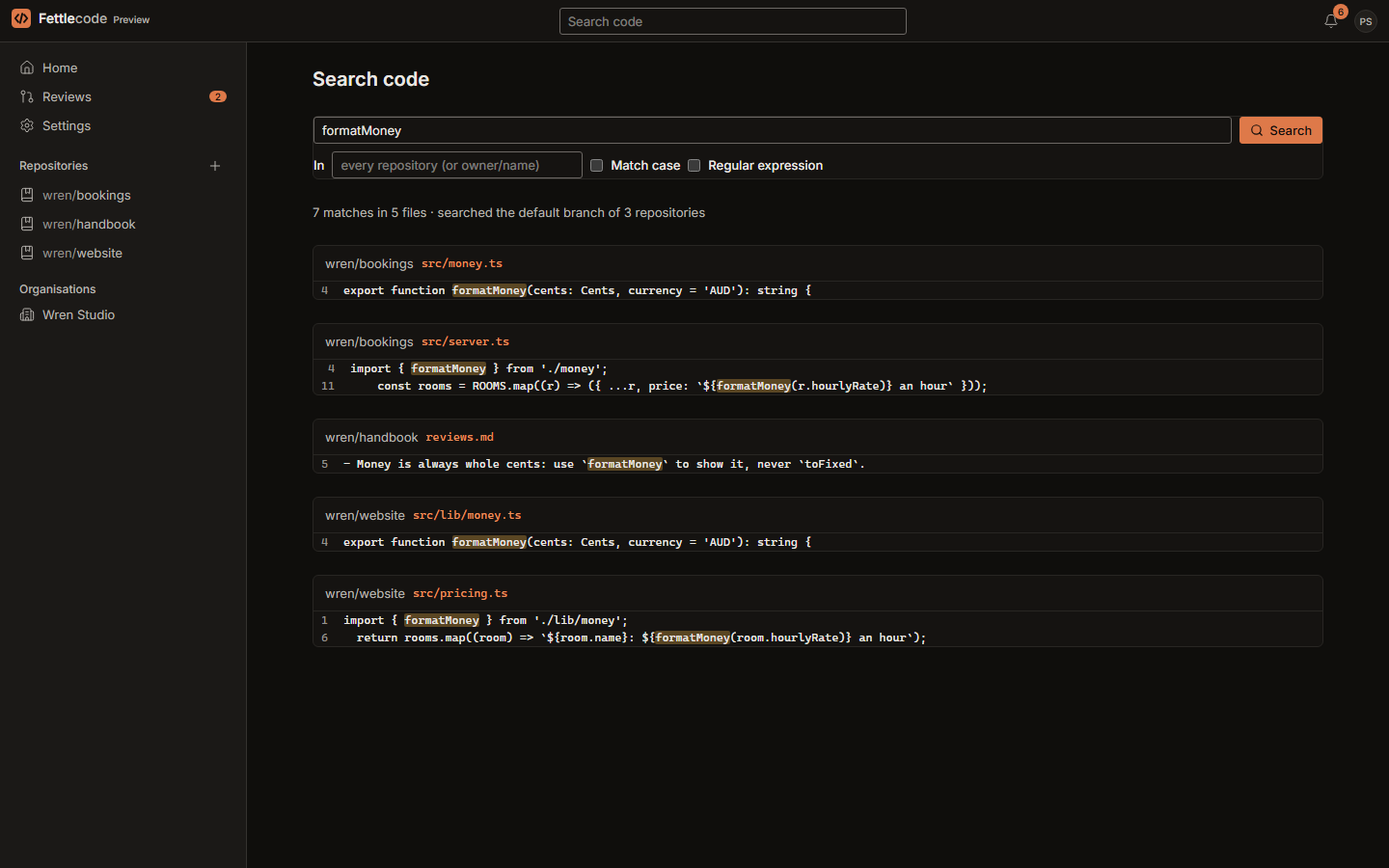
- Code search finds text, or a regular expression, in every repository you can see, or just one
- Fork any repository you can see; a fork of a private one stays private, and “Update from upstream” brings a branch up to date
- Templates: start a new repository from another's files, without its history
- Releases mark a tag, with notes drafted from the changes merged since the last one; drafts stay hidden from readers
- Download ZIP, or .tar.gz, for any branch, tag or release

Sign-in and access
Single sign-on and roles, free.
Signing in
- A username or email with a password, passkeys, and two-step sign-in
- SAML single sign-on (Okta, Entra ID, Google Workspace, ADFS and others) and any OpenID Connect provider
- Directory sign-in over LDAP, such as Active Directory or OpenLDAP
- Sign in with GitHub, or GitHub Enterprise Server
- The first person becomes the instance admin; sign-up is closed unless you open it, and owners invite people by email
Organisations, teams and roles
- Organisations with owners, members and a base role
- Teams, with roles on repositories
- Read, triage, write, maintain or admin, on any repository
- SCIM provisioning for each organisation: your identity provider adds, updates and removes members, and keeps teams in step with its groups
- An audit log for each organisation, repository and the whole instance: sign-ins, access and rule changes, direct and force pushes, and submits
Moving from GitHub
Bring your repositories, and keep working while you move.
Import
From GitHub, or any Git host over HTTPS: branches, tags and the default branch. Open pull requests, fork ones included, become changes to review. A token for a private repository is used for that import, then forgotten.
Mirrors
Keep a read-only copy that follows its source every 30 minutes or on “Sync now”. Or push every change made here, whether a push, a web edit or a submit, to up to ten other hosts.
Pull requests, both ways
Pull requests opened on GitHub become changes here and follow new commits. Approvals and requests for changes go back as GitHub reviews, and merging here closes the pull request.
Notifications and the Fettle apps
Told what matters, and linked to the rest of your work.
Notifications
- Review requests, new revisions, approvals and requests for changes, comments, merges, finished imports and failing mirrors
- Emailed a minute later unless you've read them in the app, or as a daily summary, or not at all
Fettleboard and Fettledesk
- Mention a Fettleboard card (FB-12) and the change shows on it, through Fettleboard's existing GitHub connection
- Mention a Fettledesk ticket (IT-14) and it links to the change, gets notes as the change moves along, and can be resolved when it merges
- Off until a repository admin connects them
What comes next
Planned, not built yet.
These are in the build plan, in this order. None of them works today, and the plan may change.
Edit together Next
Open a change's branch from inside its review and edit it with others in the browser, with live cursors. One person pushes a new revision, with everyone who typed as a co-author.
CI and checks Planned
Commit statuses and a runner protocol. A check result is tied to a change's work, so a rebase that doesn't change a layer doesn't run its checks again. Secret scanning on push, and signed commits with a rule that can require them.
Portability and AI Planned
Review history written into the repository itself, so a clone keeps it. JSON export, and imports from GitLab, Gitea, Forgejo and Gerrit. AI that you bring yourself and that's off by default, and an MCP server.
Insights, Pages and 1.0 Planned
Review insights, such as time to first review. Pages: a static site published from a branch. Then the Docker image, backups, docs, a security review and a screen-reader audit for the first release.
Accessibility: Fettlecode is being built to WCAG 2.2 AA, keyboard first. Automated checks and a full screen-reader audit are part of the work for 1.0.